Player Manual
Everything from your first login to the late-game systems, in one place. New to Tibia? Start with How to Play. Already know it? Jump to any system on the left.
How to Play - Step by Step
- Make an account
Go to mythana.world and register. Your login is an account name (6-18 letters and numbers) plus a password - not an email. Write them down; you log in with the name.
- Create a character
From the site or the client character screen, create a character: pick a name (letters only, must be unique), a sex, and a starting vocation (you can pick None and choose later at level 8).
- Enter the world
Press Play on the website to launch the browser client - no download. It loads the game once and caches it, so later logins are fast. Enter your account name and password, pick your character, and step into Rookgaard.
- Learn the controls
The client uses Classic Control by default. Walk with the arrow keys or left-click a tile to walk there. Left-click a monster to attack it (or right-click it for a menu: look, attack, follow). Right-click your character to open the backpack, and Shift + left-click to look at anything. Talk to an NPC by walking up and saying hi, then keywords like trade. (You can switch to Regular Control in Options.)
- Kill, loot, sell
Hunt the weak creatures around Rookgaard (rats, then stronger foes). Loot everything from corpses, and sell what you do not need to town NPCs for gold. Check a creature's bestiary page for its loot and where it lives.
- Leave Rookgaard
At level 8, talk to the oracle to choose your real vocation - Knight (melee), Paladin (distance), Sorcerer (attack magic) or Druid (healing/support) - and sail to the mainland.
- Get stronger
Learn spells from NPC teachers (all free of premium here), take hunting tasks for bonus gold and XP, and buy better gear. Chase quests for powerful reward items.
- Join the economy
Deposit real SOL to your account's wallet, trade on the player market for gold or SOL, enchant your gear, and withdraw your winnings. See The SOL Economy.
A retro Tibia server with a Solana economy, a player-driven market, an enchanting system, hunting tasks, cosmetic customization, and daily rewards. Plays instantly in your browser - no download needed.
This documentation covers everything from creating an account to mastering the late-game systems. If you are new to Tibia, begin with Getting Started and The Basics. If you already know Tibia, jump straight to the systems unique to this server.
Getting Started
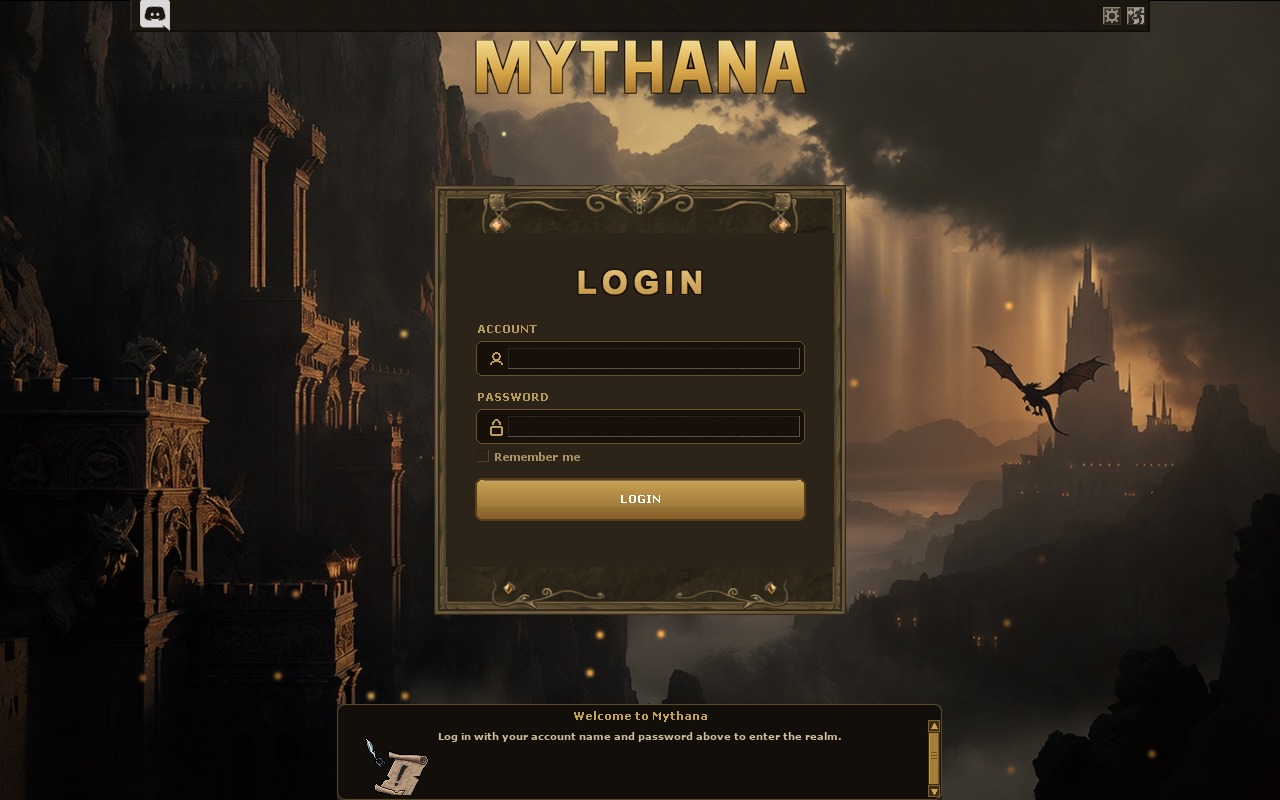
Create an account
Register on the Mythana website. You choose an account name (6-18 letters and numbers), not an email or username. Write your account name and password down somewhere safe, because you log in with the name.
After registering, create at least one character from the website or the client character screen. You choose the name, sex, and starting vocation. Names must be unique on the server.
Choose a client
There are two ways to play. Both connect to the same world with the same characters.
| Client | How to use it | Best for |
|---|---|---|
| Browser (WASM) | Click Play on the website. The client loads in your browser. | Trying the server instantly, or playing where you cannot install software. |
| Downloadable client | Download the client, run it, and log in. | Lowest input latency and long hunting sessions. |
The browser client downloads the game assets on first load, then caches them, so later logins are fast. A fresh download only happens when the server publishes a client update.
Log in
- Open the client.
- Enter your account name and password.
- Press Enter Game.
- Select a character and enter the world.
Your character appears at its home town temple the first time it logs in.
The Basics
This section is for players who have never played retro Tibia. If you know the classic client, skip ahead.
Moving and looking
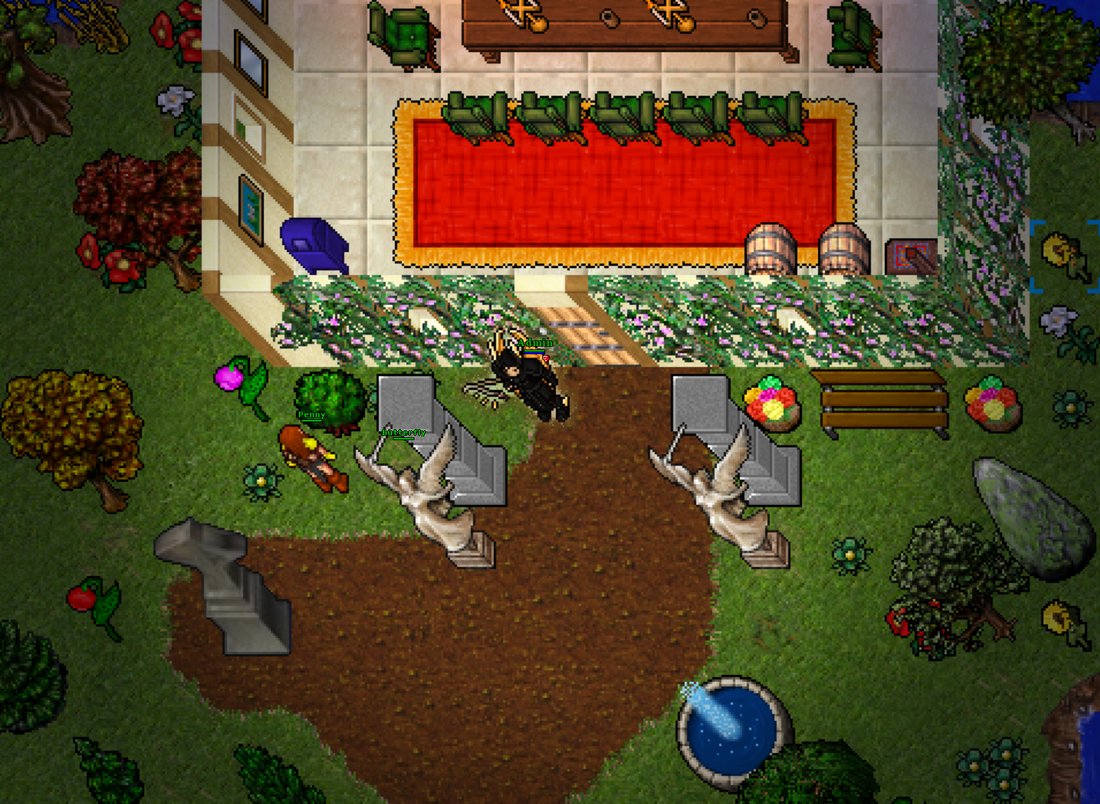
The client uses Classic Control by default (the traditional Tibia scheme). Walk with the arrow keys or the keypad, or left-click a tile to walk there. In Classic Control a single left-click on a creature attacks it; left-click empty ground to walk. Right-click anything for a context menu (look, use, attack, trade), and Shift + left-click to look. Use the minimap to orient yourself, and the floor arrows to view different levels. You can switch to Regular Control in Options if you prefer.
Health, mana, and capacity
Your character has health points, mana points, and a carry capacity. Health drops when you take damage and regenerates over time, faster while resting in a protection zone. Mana powers spells and runes. Capacity limits how much weight you carry.
Combat
With the default Classic Control, left-click a creature to attack it. You can also pick a target from the battle list, or right-click a creature and choose Attack. Your fight mode controls the balance between offense and defense:
- Full Attack deals the most damage and leaves you most exposed.
- Balanced is the middle setting.
- Full Defense raises your defense at the cost of damage.
You can also toggle chase (follow the target) and secure mode (avoid attacking other players by accident). Melee classes use weapons in hand, mages cast with mana, paladins use distance weapons, and runes cover healing, attack, and support.
Skills and leveling
Killing monsters and completing tasks earns experience. Crossing a threshold raises your level, increasing health, mana, and capacity by vocation. Weapon skills and magic level rise as you use them - swing an axe to train axe fighting, block with a shield to train shielding. There is no stamina system: hunt as long as you like at full experience, exactly like the classic game.
Death
On death you lose some experience and skill progress and return to your home temple. You can also drop your backpack and equipment - an Amulet of Loss prevents that (it is consumed on death; there are no blessings on this server). Avoid areas above your level and keep spare supplies.
Protection zones, depots, and banking
A protection zone is a safe area, usually a temple or depot, where no fighting happens. Depots store items long term and are where the Market operates. Your bank balance holds deposited gold, which you move at a banker or through the bank interface.
Window hotkeys
The most-used windows have keyboard shortcuts:
| Key | Opens |
|---|---|
Ctrl+S | Premium Shop (Store) |
Ctrl+M | Player Market |
Ctrl+I | Hunting Task Board |
Ctrl+D | Daily Rewards |
Ctrl+J | Outfit & Cosmetics window |
Ctrl+K | Hotkey manager (F-key bindings) |
The Store, Market, Task and Daily buttons in the inventory panel open the same windows - they light up gold when you stand in a protection zone.
Vocations
At character creation you pick a vocation. The four main vocations follow the classic Tibia design.
| Vocation | Role | Plays with |
|---|---|---|
| Knight | Tank and melee damage. High health and defense. | Swords, axes, clubs, shields. |
| Paladin | Ranged physical damage with balanced survivability. | Spears, bows, crossbows, support magic. |
| Sorcerer | Burst magic damage. Strong attack spells and runes. | Wands, attack spells, area runes. |
| Druid | Magic damage and healing. Strong support and control. | Rods, healing, ice and nature magic. |
Characters often begin without a vocation and choose one after the starting area. Each vocation has different health, mana, and capacity growth per level, and a different spell list.
Learning spells
Spells are not free here. In true classic fashion, you learn each spell from an NPC teacher in the vocation guilds, paying gold for the knowledge. Until a spell is learned, its words are just words. Visit your guild's spell teacher in town, ask about spells, and buy the ones your level allows - from exura and utevo lux all the way to your vocation's ultimate.
Combat & PvP
Mythana is an open-PvP world with the classic retro rules. Anyone can attack anyone outside a protection zone - and the skull system keeps the consequences honest.
The skull system
| Skull | Meaning |
|---|---|
| White skull | You attacked or killed an unmarked player. Visible to everyone; lasts while your logout block runs. |
| Red skull | Too many unjustified kills. You drop everything on death, and everyone can kill you freely. |
| Yellow skull | You fought back against someone who attacked you first - killing them is justified. |
Your own skull also shows in the conditions row under your equipment, next to effects like haste, so you always know your status at a glance.
Deaths
Dying costs experience, skills, and a chance to drop your backpack and equipment - exactly as the classic rules demand. An Amulet of Loss protects your items (but not your experience) and is consumed on death. Red-skulled characters drop everything, amulet or not. Every death is recorded on the website's Latest Deaths page, and player kills count toward the Top Fraggers board and PvP achievements.
Protection zones
Temples and depots are protection zones: no combat can happen inside, and logging out there is always safe. The Store, Market, Task and Daily windows only open while you stand in one.
Quests
The world holds over 200 classic chest quests - the original retro kind: find the room, survive the way in, and open the chest for your reward. No quest markers, no hand-holding; knowledge and courage are the requirements.
Your progress is tracked in the Quest Log window, which lists every quest and marks the ones you have completed. Famous lines like the Annihilator await the well-prepared.
Chest rewards are one per character. If a chest appears empty, that character has already claimed it.
The SOL Economy
Mythana uses two currencies.
- Gold is the classic in-game currency. You earn it from monsters, quests, and NPC sales, store it in your bank, and use it for normal trade and part of the Market.
- SOL is real Solana. It is the premium currency, used for premium time, cosmetics, the Orb of Enchantment, and high-value Market trades.
SOL is held for your account in an off-chain balance the server tracks. You top it up by depositing real SOL and take it out by withdrawing to your own wallet. Your in-game SOL is yours. The server never invents a balance, and every credit or debit is backed by a real transfer or a real in-game trade.
Premium and cosmetic prices are set in SOL so your cost stays stable and predictable, instead of swinging with a volatile token.
Your Wallet
Every account gets its own Solana deposit address, generated by the server. You do not need to link an external wallet to play.
Check your wallet
Type !wallet in game, or open the Wallet card on the website. It shows your deposit address, your current SOL balance, your premium status, and your most recent withdrawal.
Deposit SOL
Send SOL from any wallet or exchange to the deposit address shown by !wallet. The server watches the address and credits your balance automatically once the transfer confirms on chain. Nothing else is required.
Withdraw SOL
Withdrawals are done on the website: log in, open My Account, and use the Send button next to your wallet address. Enter the destination address and amount - the SOL is sent on-chain from your account balance. Withdrawals are limited to once per 24 hours.
Always double-check the destination address before confirming. On-chain transfers cannot be reversed.
The Market
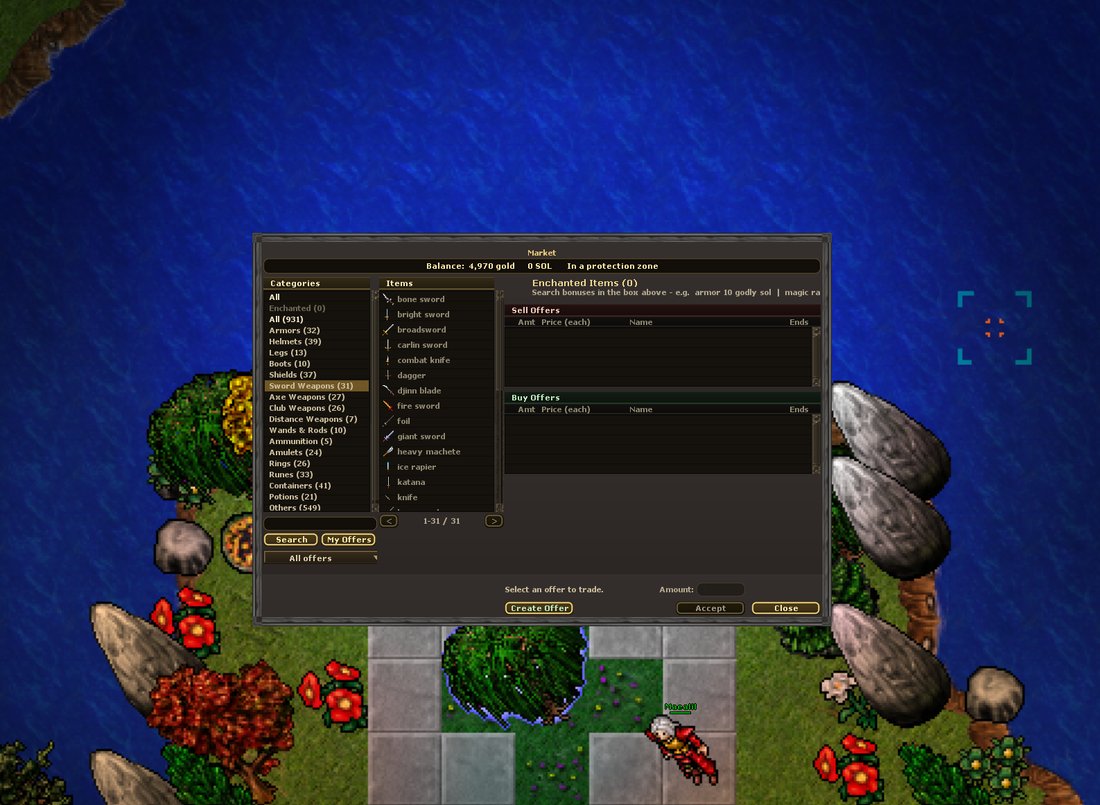
The Market is a two-sided, player-driven trading system modeled on the real Tibia Market. It supports both gold and SOL.
How it works
- A sell offer lists items you own at a price per piece. The items are held by the Market until the offer is filled or cancelled.
- A buy offer states what you want and at what price. The funds are reserved up front.
- You accept an existing offer to trade against it, in any amount up to the remaining quantity. Offers can be partially filled.
Each offer has a 5% creation fee (with a small minimum and a capped maximum - token holders pay 2.5%), a thirty-day expiry, and an optional anonymous flag that hides your name.
Creating and accepting offers require standing inside a protection zone (a depot). Cancelling is not restricted to a protection zone.
Trading in the Market window
Everything happens in the in-client window: open it with the Market button in the side panel or Ctrl+M while standing in a protection zone.
- Find your item. Browse the category list or type in the search box - the catalog shows every tradeable item with its sprite and best prices, not only items with active offers.
- Read the market. Selecting an item shows its current sell and buy offers plus thirty-day price statistics, so you know what a fair price looks like.
- Accept an offer - pick one, set the amount (partial fills are fine), and confirm. Or...
- Create your own offer with the Create Offer button: choose sell or buy, the amount, the price per piece, and the currency (gold or SOL). The dialog previews the 5% fee live before you commit. Tick anonymous if you want your name hidden.
- Manage your offers in the My Offers view - cancel any time to get your items or reserved funds back.
Trades settle even while the other side is offline: sold goods and gold arrive in your delivery inbox automatically the next time you log in or open the Market - nothing to collect manually.
Gold prices are entered as gold pieces. SOL prices are entered as a decimal amount of SOL, for example 0.05.
The delivery inbox
If items or funds are owed to you while you are offline, such as a filled buy offer or a returned cancellation, they wait in your inbox. It is delivered automatically on login and when you open the Market, and you can pull it manually with !collect.
Watchlist
| Command | What it does |
|---|---|
!watch <itemId> | Add an item to your watchlist. |
!unwatch <itemId> | Remove an item from your watchlist. |
!watchlist | Show your watchlist. |
You are notified on login when a watched item is for sale.
The enchanted-item market
Enchanted gear is unique, so it is traded by its one-of-a-kind code rather than by item id.
| Command | What it does |
|---|---|
!enchmarket [filter] | Browse enchanted items for sale, for example !enchmarket armor 10 godly. |
!offerench <code> <price> <gold|sol> | List one of your enchanted items. Put it in your depot first. |
The Premium Shop
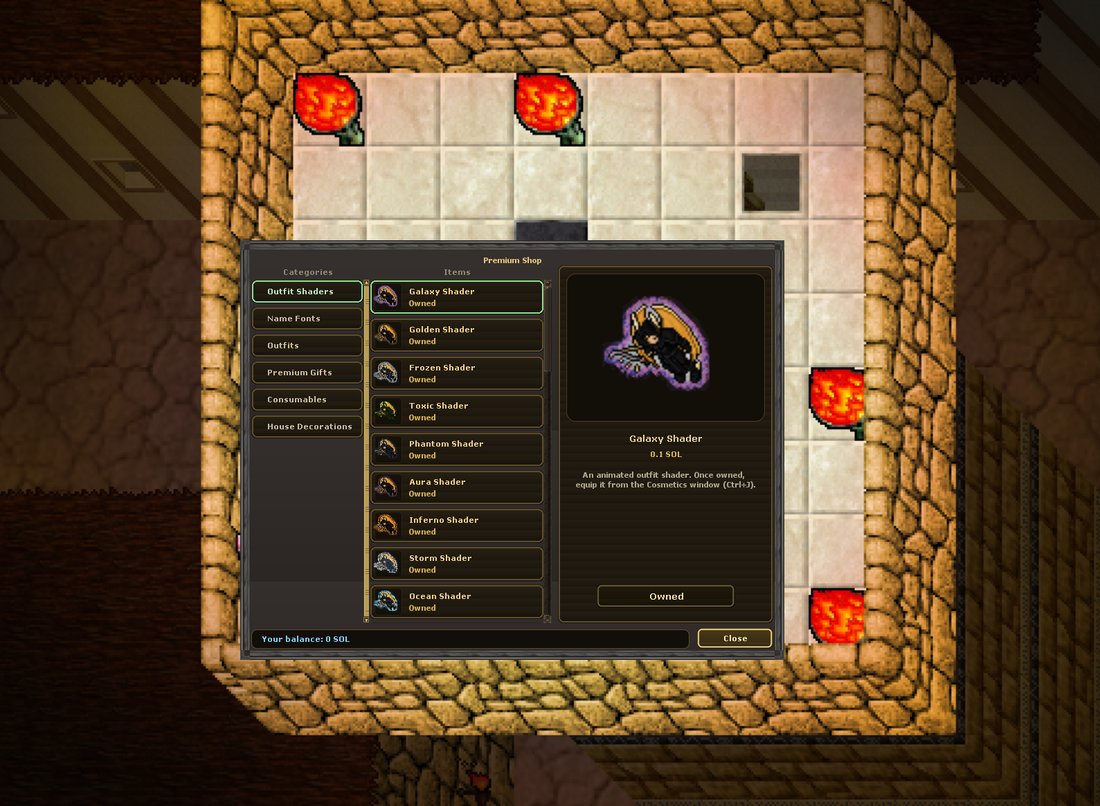
The Premium Shop sells cosmetics and useful items directly from the server for SOL. Open it with the Store button. It sells:
- Outfit shaders (animated effects for your character),
- the Premium Rose and other gift items,
- house decorations (statues, tables, chairs, vases, plants, trophies, and more),
- the Orb of Enchantment.
Every row shows the item sprite, name, and SOL price, with a Buy button. Purchases are delivered straight to your character.
If your inventory has no room for a purchase, the SOL is refunded automatically. You never lose money to a full backpack.
Houses
Player houses are bought with gold, right at the door - stand in front of an empty house and claim it. Houses give you private, guaranteed-safe storage and a place to show off.
| Command | What it does |
|---|---|
!buyhouse | Buy the house whose door you are facing. |
!sellhouse | Sell your house to another player. |
!leavehouse | Give the house up. |
Furnish it from the Premium Shop's House Decorations category - statues, tables, chairs, vases, plants and trophies, delivered straight to your backpack.
The Token
Mythana has its own token, launching on pump.fun. It is a utility token: holding it unlocks in-game benefits. It never replaces SOL - purchases, the market, and withdrawals all keep running on SOL exactly as described above.
Supply
- 95% goes to the liquidity pool at launch.
- 5% is the dev supply, reserved for future events and giveaways - tournament prizes, community drops, and seasonal events.
Holder benefits
Hold 10,000+ tokens in the wallet linked to your account and the game unlocks, automatically:
| Benefit | Detail |
|---|---|
| 2.5% market fee | Half the normal 5% listing fee on every offer you create. |
| 2.5% withdrawal fee | Half the normal 5% fee when you withdraw SOL to your wallet. |
| Monthly exclusive cosmetics | A new outfit or shader airdropped to holders every month - never sold in the shop, not obtainable any other way. |
| One extra daily wheelspin | A second spin on the daily wheel (level 20+, once per account per day). |
How it works
Link your wallet on the website (Connect Wallet on the login page, or the Wallet row on My Account). The server checks your token balance periodically - no deposits, no transfers, the tokens never leave your wallet. Drop below 10,000 or unlink the wallet and the benefits switch off automatically; exclusive cosmetics can only be worn while you qualify.
Benefits are cosmetics and convenience only - holders gain no combat advantage of any kind.
Cosmetics
Cosmetics are visual only - they never change your stats. They are bought with SOL in the Premium Shop and, once owned, are yours for good.
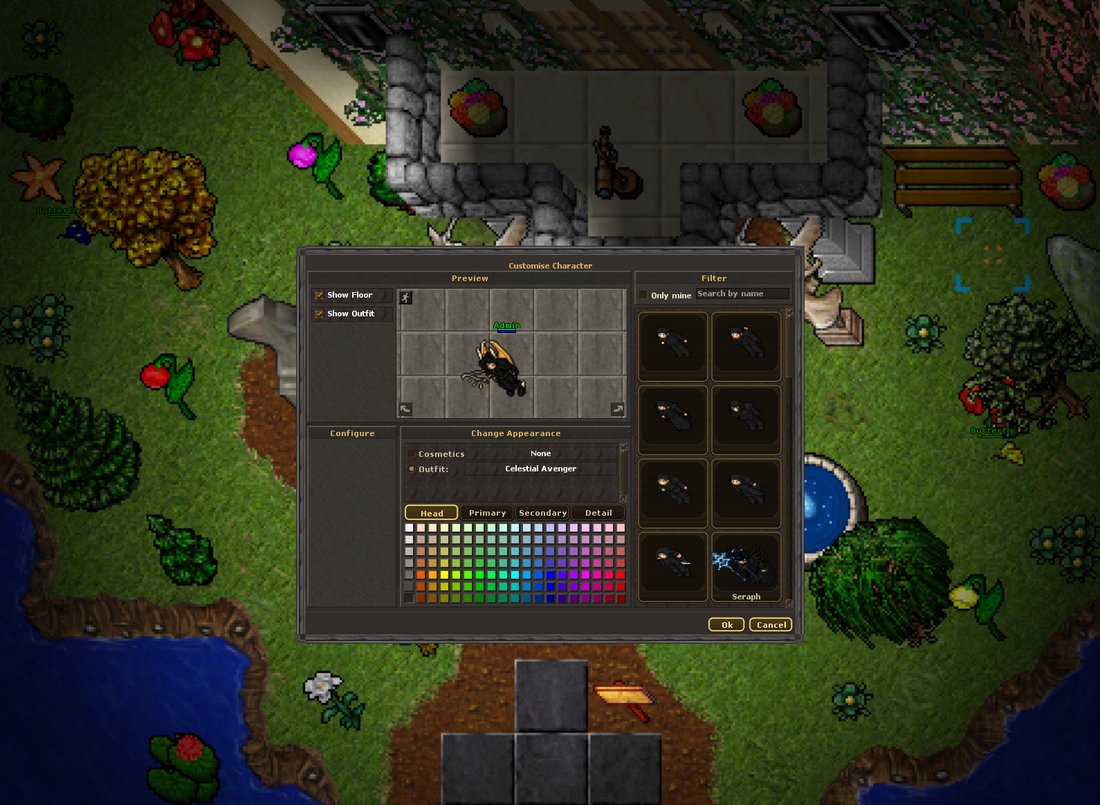
How it works
- Buy in the Premium Shop (Store button or
Ctrl+Sin a protection zone). Shader and font rows show a live preview on your own character before you spend anything. - Equip in the Outfit window (
Ctrl+J, or right-click yourself → Customise Character). The Cosmetics section lists your fonts and shaders - selecting one previews it on the model. - Click OK to apply. Everyone around you sees the result.
Outfit shaders
A shader is an animated effect applied to your outfit - a living halo everyone around you sees. There are 34 shaders, from elemental classics (Inferno, Frozen, Storm, Toxic) through cosmic showpieces (Galaxy, Celestial, Void, Starfall, Constellation) to uniques like Chrono (a rotating clockwork of time), Vitrail (living stained glass), Phoenix (beating flame wings), Sakura (falling cherry blossoms) and Obsidian (black marble veined with molten gold).
Name fonts
Your character's name can wear a custom typeface that everyone sees - 15 fonts including Bold, Classic, Fancy, Impact, Royal, Typewriter, Elegant and Modern. The name keeps its health color; only the lettering changes.
Premium outfits
Beyond the classic looks, the shop sells nearly 30 exclusive outfits - from the winged Seraph and frost-armored Frostguard to the Fiend Slayer, Celestial Avenger, Winged Druid and the radiant Golden outfit. Every outfit comes in both female and male versions, many with subtle idle animations - your character breathes, wings flutter, flames flicker even while you stand still. Once bought, pick it in the Set Outfit window like any classic look.
Enchanting
Enchanting adds random bonus stats to a piece of equipment, turning ordinary gear into something unique and tradeable.
How to enchant
- Get an Orb of Enchantment, available in the Premium Shop for SOL, or as a rare drop.
- Use the orb on a piece of equipment.
- The item rolls a tier and one or two bonus stats, and becomes a named, enchanted item.
Only valid equipment can be enchanted (weapons, armor, helmets, legs, boots, shields, amulets, rings, wands, rods). Items with charges or a duration cannot be enchanted, and an already-enchanted item cannot be enchanted again.
Tiers
| Tier | Chance | Relative power |
|---|---|---|
| Common | 50% | Modest bonuses. |
| Rare | 30% | Solid bonuses. |
| Legendary | 15% | Strong bonuses. |
| Godly | 5% | The best bonuses. |
Bonus stats
An enchant rolls one or two stats from a pool that depends on the item type: fighting skills, magic level, distance fighting, armor, shielding, speed, attack speed, health and mana regeneration, weapon damage, maximum health, and maximum mana. The system respects weapon and vocation rules, so a wand never rolls melee skills and a knight item never rolls magic level.
The glow and the code
Enchanted items have a tier-colored outline, visible on your character, in your bags, and on the ground (grey or white for Common up to gold for Godly). Each enchanted item is also stamped with a unique code (three letters and two digits, for example W8B3I) that identifies it forever. The code appears in the item description, on the website, and in the enchanted-item market.
Where enchanted gear comes from
- The orb: you make it yourself by using an Orb of Enchantment on your gear.
- Rare drops: a small fraction of kills drop an already-enchanted item, identical to an orb-made one. A colored aura over a corpse signals a rare find, and the color tells you the tier from a distance.
Hunting Tasks
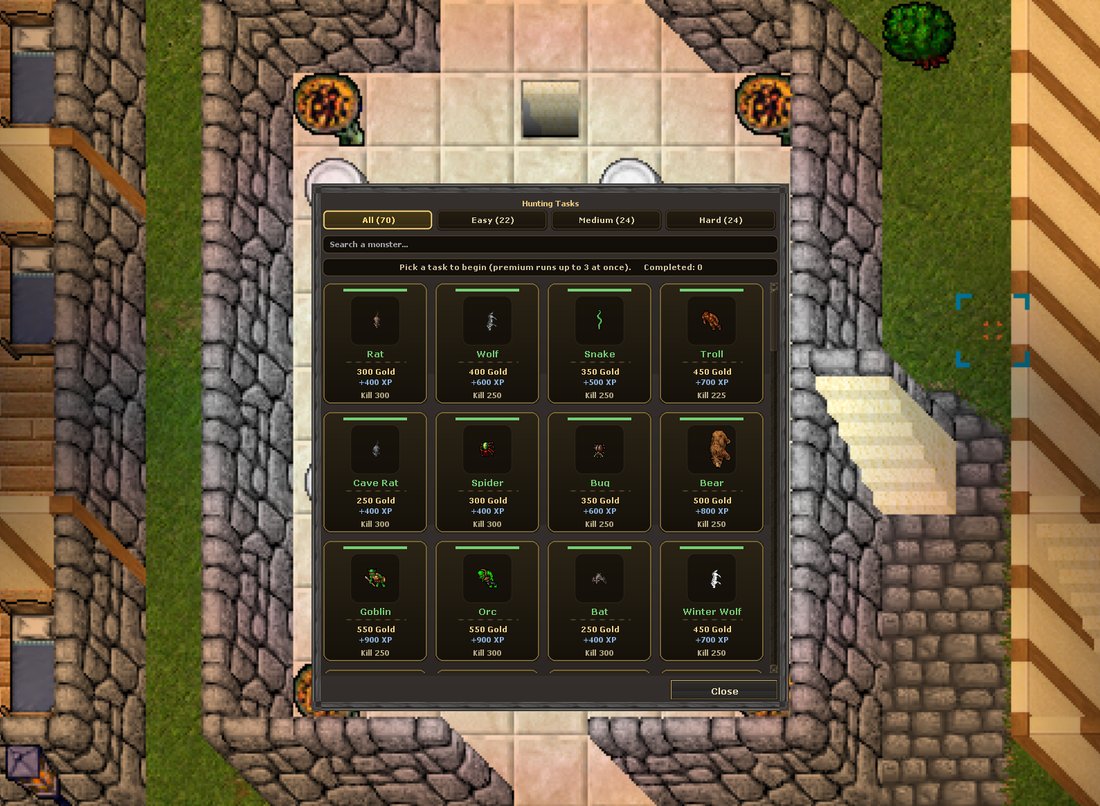
Hunting tasks are repeatable contracts: pick a monster, slay the required amount, and claim a gold + experience reward on top of your normal hunt.
How tasks work
- Open the Task Board with the Task button (or Ctrl+I) while in a protection zone.
- Click a monster card to accept its contract. Every kill counts automatically and a tracker on your screen shows live progress.
- When the counter is full the card turns green - click it to claim your reward. Tasks are repeatable.
- Premium accounts run up to 3 tasks at the same time. Free accounts run one.
| Tier | Tasks | Kills required | Rewards up to |
|---|---|---|---|
| Easy | 22 | 225 - 300 | 550 gold + 900 XP |
| Medium | 24 | 350 - 375 | 4,800 gold + 11,200 XP |
| Hard | 24 | 425 - 600 | 34,500 gold + 228,000 XP |
Completing tasks also unlocks achievements and wearable titles - see the full catalog on the Hunting Tasks page.
Daily Rewards
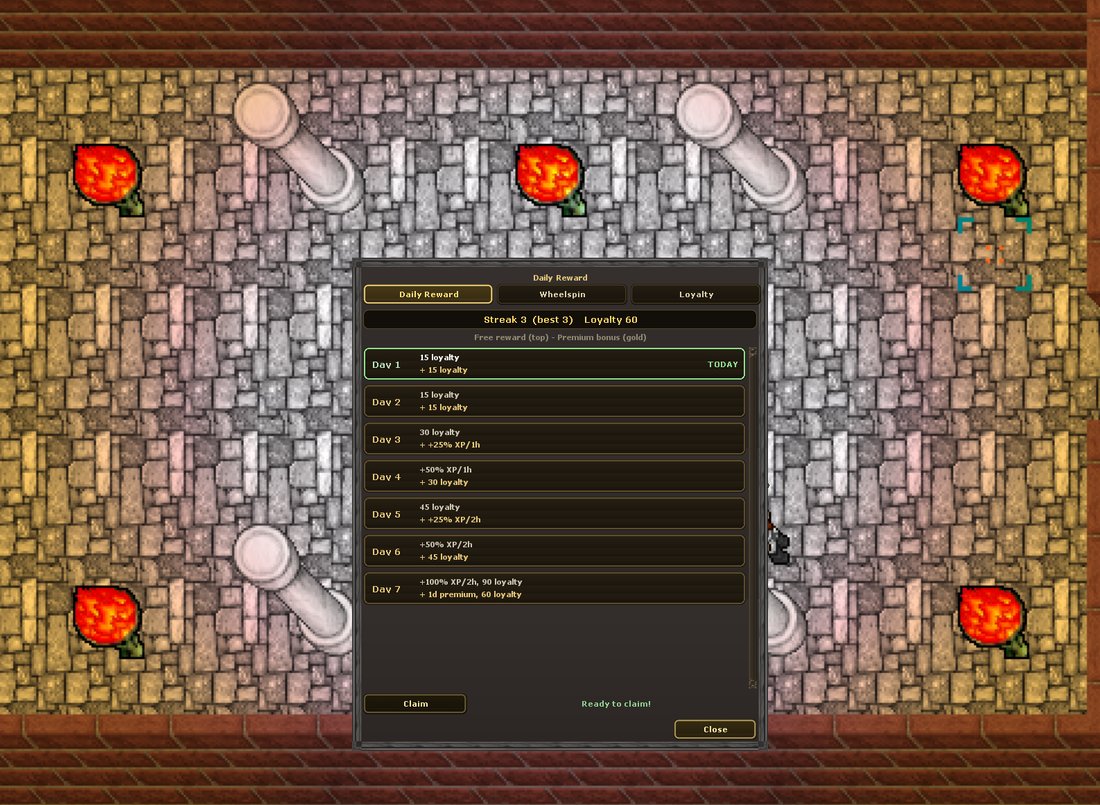
Logging in every day earns a reward, and keeping a streak earns more. Everything lives in one window - open it with the Daily button or Ctrl+D in a protection zone. It has three tabs:
Daily Reward
The seven-day calendar. Hit Claim once per day (per account, no matter how many characters you have). Consecutive days build your streak; missing a day resets it to day one. The cycle resets at midnight UTC. Rewards are account-bound and never tradable - the cycle grants:
- Loyalty points, a soulbound currency that scales with your level,
- timed experience boosts - up to +100% for two hours on day seven,
- and, for premium accounts, a bonus premium day on the headline day.
Premium accounts receive an enhanced reward on every day of the cycle. To keep claims fair, rewards unlock once the claiming character is level 20 with at least two hours of play time.
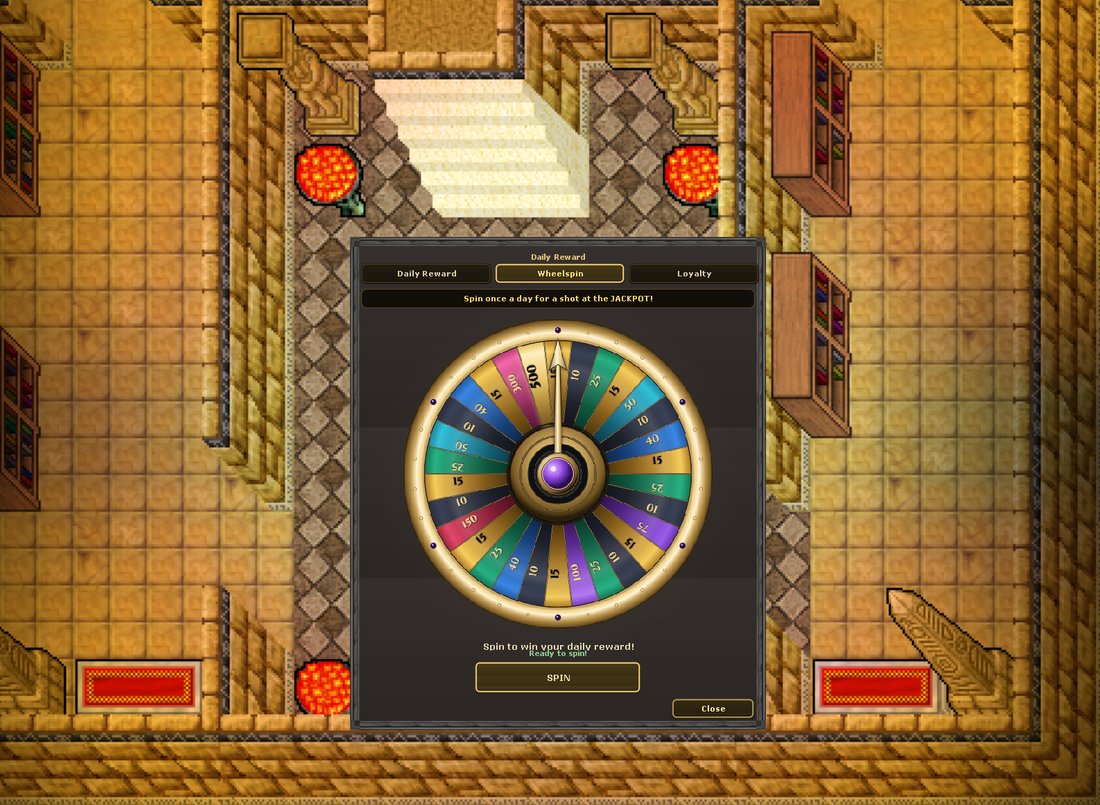
Wheelspin
Premium accounts get one free spin every 24 hours. The wheel pays Loyalty Points - most segments land between 10 and 50, with rarer 75, 100 and 150 slices and a 500-point jackpot. Hit SPIN and watch it turn.
Loyalty
The loyalty tab is a small prestige shop for the points your streak earns:
| Reward | Cost |
|---|---|
| Experience Boost (+50% for 1 hour) | 60 points |
| Greater Experience Boost (+100% for 2 hours) | 140 points |
| Orb of Enchantment | 350 points |
| Galaxy Shader (prestige - grindable without SOL) | 800 points |
Achievements & Titles
Achievements recognize milestones across the game's systems: hunting tasks, PvP, enchanting, level, and wealth. They are computed from your existing progress, so there is nothing extra to track. You earn them by playing.
Some achievements grant a title you can wear in game. You view your achievements and choose your active title on the website. Once set, your title appears next to your character's name when another player looks at you, alongside your achievement points on your profile.
Live Casts
Any player can broadcast their gameplay live, and anyone can watch - straight from the website.
| Command | What it does |
|---|---|
!cast on | Start casting. Your stream appears in the website's Live Casts panel. |
!cast off | Stop casting. |
!cast password <pw> | Make your cast private. |
!cast | Show your cast status and viewer count. |
Spectators join from the game login by entering account 0 and the character name cast:YourName - or simply click a live cast on the website. Watching is read-only; spectators can never act for you.
Fair Play
Anti-bot human check
From time to time the server may ask you to confirm you are human, especially if your account has been actively trading SOL. You will see a short code. Confirm it within the time limit:
!human <code>Anti-RMT protections
The SOL market is monitored for abuse patterns such as suspicious trade velocity and wash trading. Most checks only flag accounts for staff review rather than blocking them, so normal play is never interrupted. Play normally and you will never notice these systems.
Soulbound items
Some rewards, such as daily reward items, are soulbound. A soulbound item is bound to you. It cannot be sold on the Market, dropped on the ground, or traded to another player. This keeps reward systems from being exploited.
The Website
The website is your account's home base outside the game. From it you can register and create characters, look up character profiles, browse the hunting task catalog, view achievements and choose a title, browse the Market as a read-only catalog, manage your wallet, buy premium, and launch the browser client.
Discord
The server runs a live Discord feed that posts notable events as they happen: rare enchanted drops, high-profile deaths, level milestones, and new Market listings. It is a good way to follow the pulse of the server and to spot rare items hitting the Market.
Command Reference
Every player chat command, grouped by system. Type them in the game chat.
Wallet and premium
| Command | Description |
|---|---|
!wallet | Show your deposit address, SOL balance, and premium status. |
| Withdrawals | Done on the website: My Account -> Send (once per 24 hours). |
!buypremium | Buy premium time with SOL. |
Market
The Market is operated entirely through its window (Market button or Ctrl+M in a protection zone) - browsing, creating offers, accepting and cancelling are all buttons, no commands needed. See The Market.
Cosmetics
Shaders, name fonts and outfits are bought in the Premium Shop and equipped in the Outfit window (Ctrl+J) - no commands needed.
Progression
| Command | Description |
|---|---|
| Daily rewards | Claimed in the Daily window (Ctrl+D) - streak calendar, wheelspin and loyalty shop. |
Houses and casting
| Command | Description |
|---|---|
!buyhouse | Buy the house you are facing. |
!sellhouse | Sell your house to another player. |
!leavehouse | Give your house up. |
!cast on / off | Start or stop a live cast of your gameplay. |
!cast password <pw> | Protect your cast with a password. |
Shop and fair play
| Command | Description |
|---|---|
!human <code> | Answer an anti-bot human check. |
Troubleshooting
The browser client looks out of date after an update
Your browser may be serving a cached copy of an older build. Reload once with a hard refresh (Ctrl+Shift+R), or open the page in a private window. The client is served with cache revalidation, so a normal reload usually picks up a new build on its own.
I deposited SOL but my balance has not updated
Deposits are credited after the transfer confirms on chain. Give it a short while, then check !wallet again. If it still has not appeared after the network has confirmed the transaction, contact staff with your account name and the transaction signature.
I cannot create a Market offer
You must be standing inside a protection zone (a depot) to create or accept offers. Cancelling does not require one.
My withdrawal was rejected
Withdrawals are limited to once every 24 hours, and the amount cannot exceed your in-game SOL balance. Check both, and confirm the destination is a valid Solana address.
A purchase did not arrive
Premium Shop purchases go to your inventory. If your backpack is full, the purchase is refunded in SOL automatically. Make room and buy again.